 |
|
|
 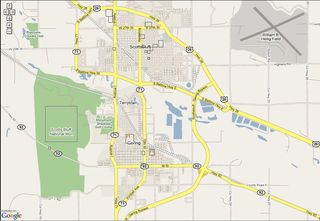 Nebraska Maps - Interactive & Printable Where in Nebraska is this?  *Answer at bottom |
Interactive & Printable
|
| Sandhill Crane Migration | l | Scottsbluff Attractions | l | Toadstool Geologic Park | l | Deer Running in Yard Video | l | Western Nebraska Road Trip |
|
|
 Tip - Use <Ctrl><+> keys on keyboard to make the Text Larger Tip - Use <Ctrl><+> keys on keyboard to make the Text Largerand <Ctrl><-> for Smaller Text on most newer browsers
Nebraska Maps - Attractions and Points of Interest Areas
|
 Â
 |
|
Both Google and Yahoo Maps have a very easy to use map function to calculate the distance between two or more points that instantly gives you an estimate of the number of miles traveled between the points, as well as the estimated time it will take to drive the route. A by-product of the calculation is turn-by-turn directions for the route, as well as a general over-all map of the route.
Shortest Driving Time Vs Shortest Distance Map Route
Â
The Distance map calculator is set to select the route that takes the least driving time, not necessarily the shortest route.
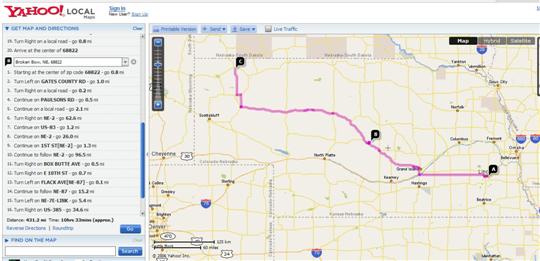
For example, a trip to Chadron, Nebraska from Lincoln, NE (68516) by the shortest distance through Broken Bow on Scenic Hwy 2 if you "force" the route by defining point B on the way from Lincoln as Broken Bow. The distance is calculated by the Yahoo Distance Map Calculator as 431.2 Miles and a driving time of approximately 10 hours and 22 minutes. This link shows that . A screen shot view of that Nebraska Maps page is shown below.
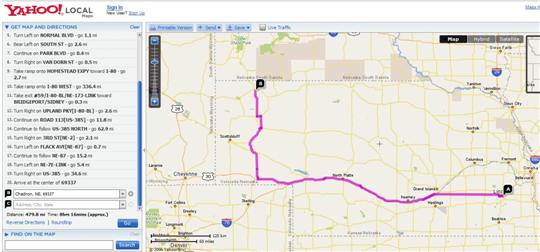
If you just select Point "A" as 68516 in Lincoln, Nebraska at Yahoo Maps, and point B as Chadron, Nebraska, the Calculator routes you Via the "fast" I-80 route out to US-385 straight north up to Chadron -- a distance of 479.8 miles (48.6 miles further than above route through Broken Bow), but a driving time of only 8 hours and 16 minutes taking the fast 75 MPH I-80 miles into account. This link shows that faster Map route calculated and plotted at Yahoo Maps. Screen shot view of that Map page is below.
Use either of the Yahoo Nebraska Map Links above and fill in your own locations to check driving times and distances at Yahoo Maps.
|
|
Differences in Calculations between Yahoo Maps & Google Maps
Â
Google now has a Google Maps function which works similar to Yahoo. When we checked some of the same driving trips against Yahoo, we found that the distance estimates were usually almost identical, and often the driving time estimates were also.
Tip
However, on several road trips we checked, Google Maps would show estimated significantly shorter driving times than Yahoo Maps -- as much as one hour shorter driving time on some approximately 7 to 9 hour trips we checked.Example: This link shows the Google Maps version of the same as shown in link above on Yahoo Maps so you can compare. Yahoo Maps estimates this 7 - 8 hour drive as taking over an hour longer than Google Maps. If you would prefer to arrive early than late, then should plan using the longer driving time estimates.
The driving time differences actually seemed larger on shorter "in-state" trips than when estimating long distance driving times across several states. Check your road trip on both types of Maps to be sure and use the time estimate which looks like the closest to you. Use the Google Map link above and fill in your own destinations to check your own Nebraska Maps and road trip driving times at Google.
Interactive Nebraska Maps where you can add your own Location Comments
Google started the new Interactive Map technology with their "Google Earth" which requires a special software download to take advantage of all the "animated" zooming up and down simulated "flying" from location to location features. Fun to view if you haven't tried it yet.
Now both "Google Maps" and "Yahoo Local" use technology where you can simply right click on a map to "grab" it and drag the map to a new position without having to wait for a new map image download. Not "flying" from point to point, but still a great improvement over the slow reloading maps of the past.
Now can add WikiMapia Map Labels and Content - like Wikipedia Encyclopedia
WikiMapia now is a Global Map Site using Google Maps technology that encourages "Lets Describe the Whole World" wherein Users are encouraged to add their own Map Points of Interest Descriptions and comments -- with user "controls" and editing similar to used on the very popular and growing Wikipedia Free Online Encyclopedia that anyone can contribute to. Reviews, controls, and checks of User added content is done by other users and the Wikipedia or WikiMapia "editors." The system has been perfected with the Wikipedia Encyclopedia User Added Content and seems to now work pretty well.
WikiMapia just adds a "layer" with the WikiMapia user defined Points of Interest and Attraction comments "on top of" the Google Earth Map technology. You can use the map controls on the WikiMapia Maps page below to view, "grab and drag," and zoom in and out on the Nebraska Map Image below - just as you would on a Google Interactive Map.
Detailed Street Views for Town Maps
You can zoom in close enough in the "Map" view to get very detailed street views in towns. The "Hybrid" view is a combination of some Road Map information with Satellite Images and thus cannot be zoomed in as close as the road "Map" view since that much detail is not available from Satellite Images -- yet.
Tip Would suggest you bookmark this page before working with the WikiMapia Interactive Nebraska Map below since when you click on the red "WikiMapia" link in the upper right corner, the map opens into a full window that replaces this and is hard to back up to after you have worked with the map some.
  OR - Easy - Simply click on this New Nebraska-Maps Page Link to open a new duplicate window on top of this page at this spot before you click to the full window WikiMapia Nebraska Map View. This page will then remain underneath of your new Nebraska Map Window to come back to.
The red drop down links that appear in the upper left of the new WikiMapia window are fairly self explanatory and even allow you to add your own Map Content descriptions for all to see. Would suggest you read the WikiMapia FAQ list before you get too carried away adding your own very "Public" Map Descriptions.
|
Interactive and Printable Nebraska Maps (best viewed with FireFox - see Info at lower left) Google Interactive Satellite Map from WikiMapia - you can see very detailed terrain characteristics in zoomed in "Hybrid" view. |
|
|
|
A listing of some of the pages on this Nebraska Travels Site now, plus some of the pages and pictures to come are in the Menu listing to the top left. The list of the pages here now + descriptions is below. . Toadstool Geologic Park in the Chadron, NE "Badlands" area northwest of the Western Nebraska Sandhills -- plus Hiking Trail Info and Photo Gallery (Some High Resolution Photo Versions are now also available.)
         Gene
forwards to a page of Links with descriptions for this, + our Affordable US Beach & Fall Foliage Vacation Guide Sites + Sunset Photos Gallery
-- easy to remember to come back to any of our US Vacation Sites! Â
Thanks for dropping by -- come back and visit us soon for
Info on your next Affordable Nebraska Travels -- or to check out our latest Picture additions!    Gene  - - send your comments or suggestions -- or share your own Scottsbluff NE Travels and Nebraska Sandhills or Panhandle favorites or pictures. We appreciate your comments and feedback! |
|
|
|

 Â
Â